Run Minecraft, FiveM, Rust and your tools on a full Linux VPS. Choose your software, keep root access and build your environment with Peeryx network protection included.
The monthly equivalent helps compare offers. A 3, 6 or 12 month term is paid in full; it does not mean monthly charges. Each configuration still shows the billed total and renewal amount.
Configurations: 7 · 1 month
Select 2 or 3 plans to compare them.
0 / 3
VPS / KVM
2GB
Linux · KVM
VPS GAMING · 2 GB
Due when ordering2.99 €for 1 month
Renewal: 2.99 € / 1 month
No setup fee
Due when ordering8.52 €for 3 months
Renewal: 8.52 € / 3 months
2.84 € equivalent / month at renewal
− 0.45 €Renewal saving
Compared with the monthly renewal rate over the same duration. The full term is paid upfront.8.97 € → 8.52 €
No setup fee
Due when ordering16.14 €for 6 months
Renewal: 16.14 € / 6 months
2.69 € equivalent / month at renewal
− 1.80 €Renewal saving
Compared with the monthly renewal rate over the same duration. The full term is paid upfront.17.94 € → 16.14 €
No setup fee
Due when ordering28.68 €for 12 months
Renewal: 28.68 € / 12 months
2.39 € equivalent / month at renewal
− 7.20 €Renewal saving
Compared with the monthly renewal rate over the same duration. The full term is paid upfront.35.88 € → 28.68 €
No setup fee
Your resources
1 Gbit/s included↗Up to 6 Gbit/s
Paid upgrade from your client area
View speed upgrades
1 Gbit/s included. €49.00/month per additional Gbit/s, up to 6 Gbit/s per VPS. No traffic quota.
After delivery: your VPS → Network & IPs → Upgrade network speed.
The speed limit applies to the whole VPS and all its IPv4 addresses. It is a maximum speed, not a guaranteed throughput.
Processor
1 vCPU
Memory
2 GB RAM
Storage
20 GB SSD
Host CPU: Ryzen 9 5900X
DDoS protection included · PeeryxPeeryx upstream capacity15 Tbps+
No configuration matches your criteria. Adjust the budget or minimum resources, or explore another range.
How do I choose my resources?
RAM determines available memory; vCPUs share the host processor. Usage depends on your software, mods and players. The listed storage is your service limit. Start with your project’s requirements and monitor usage in the panel.
What does the displayed price include?
The main amount covers the entire selected term, including any setup fee. Renewal is shown separately. Paid options are detailed before confirmation in the client area. Amounts are in euros.
CUBIXSERV / PANEL
Your system. Your applications. A panel to manage them.
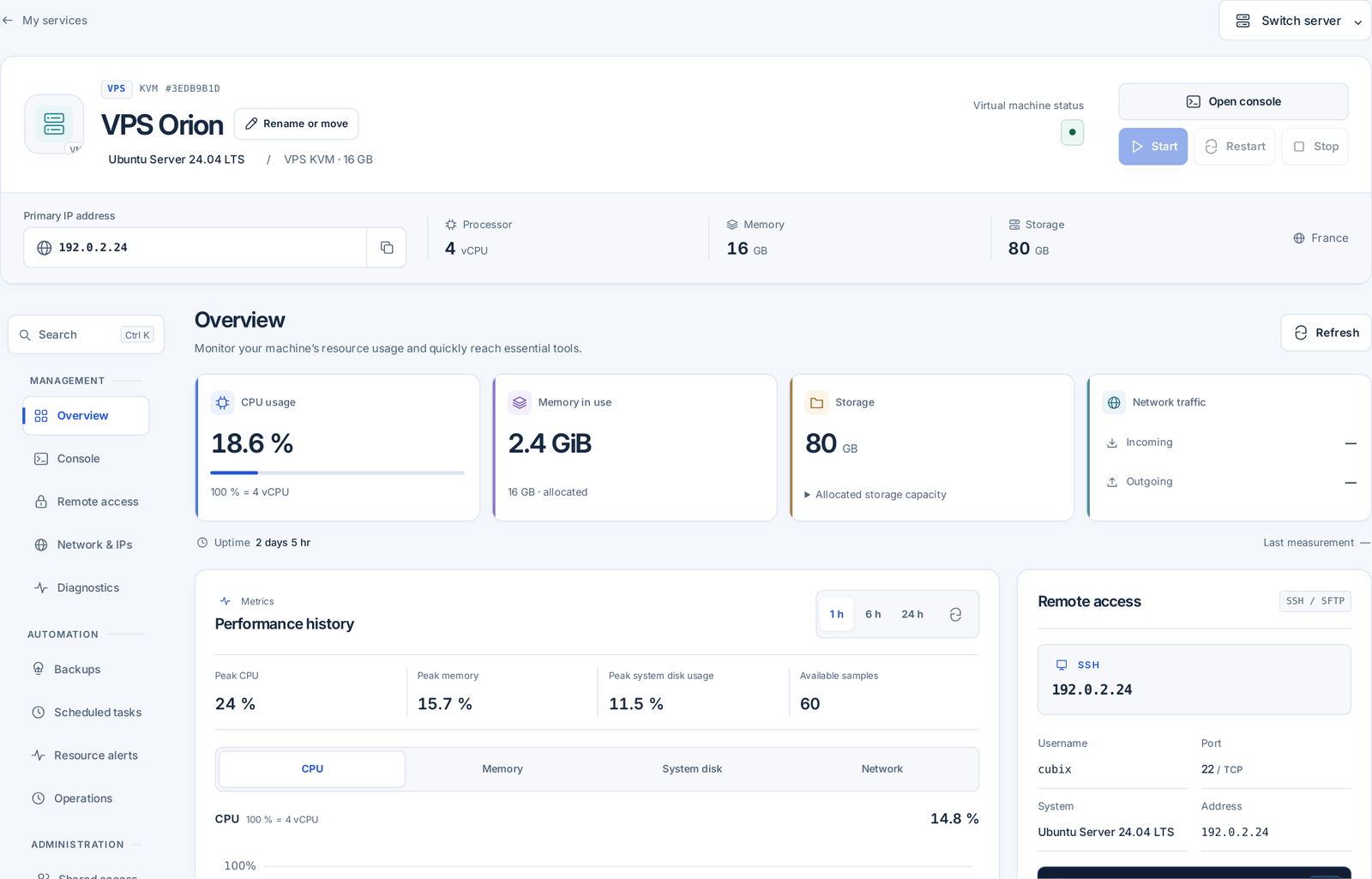
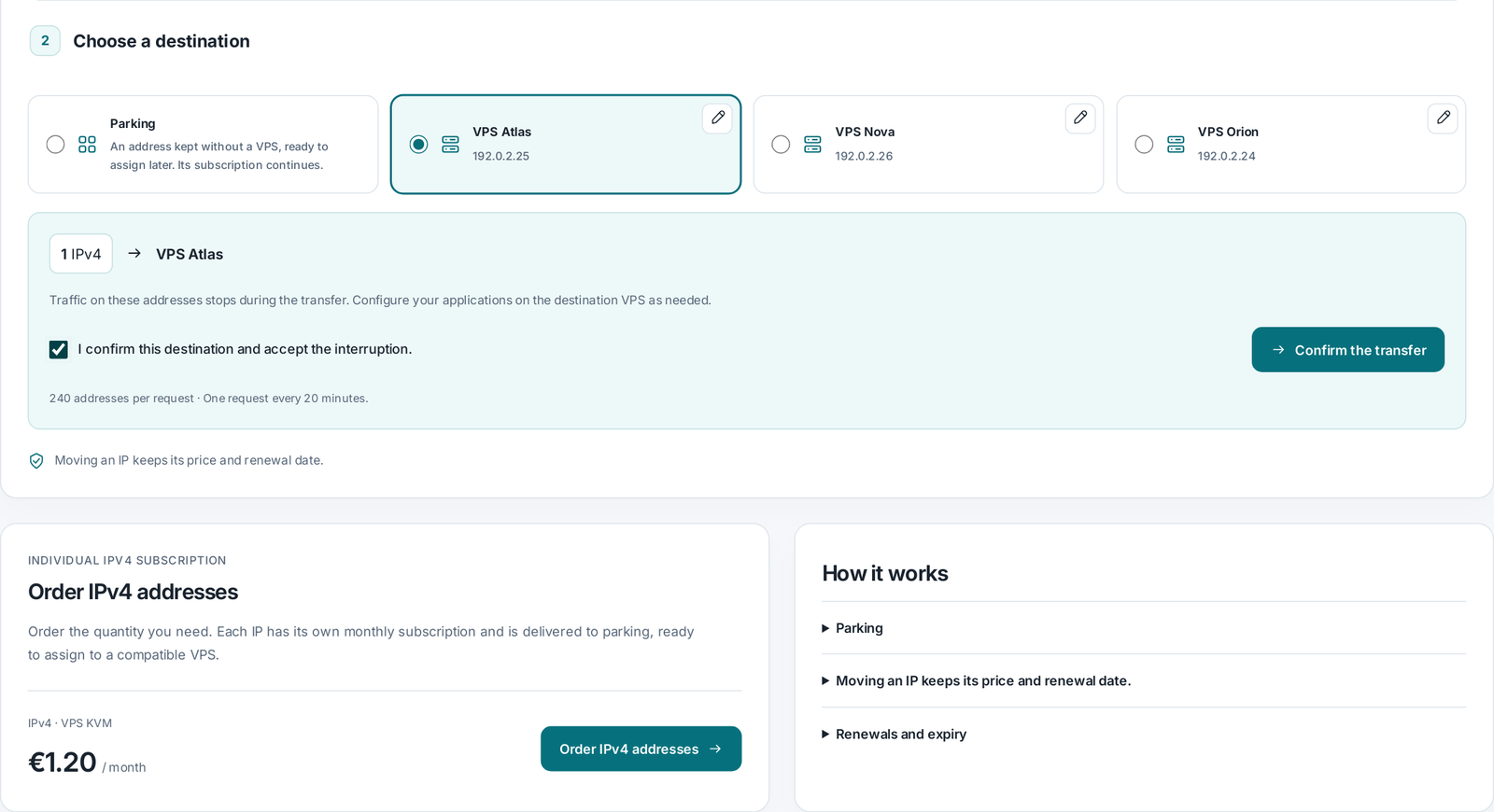
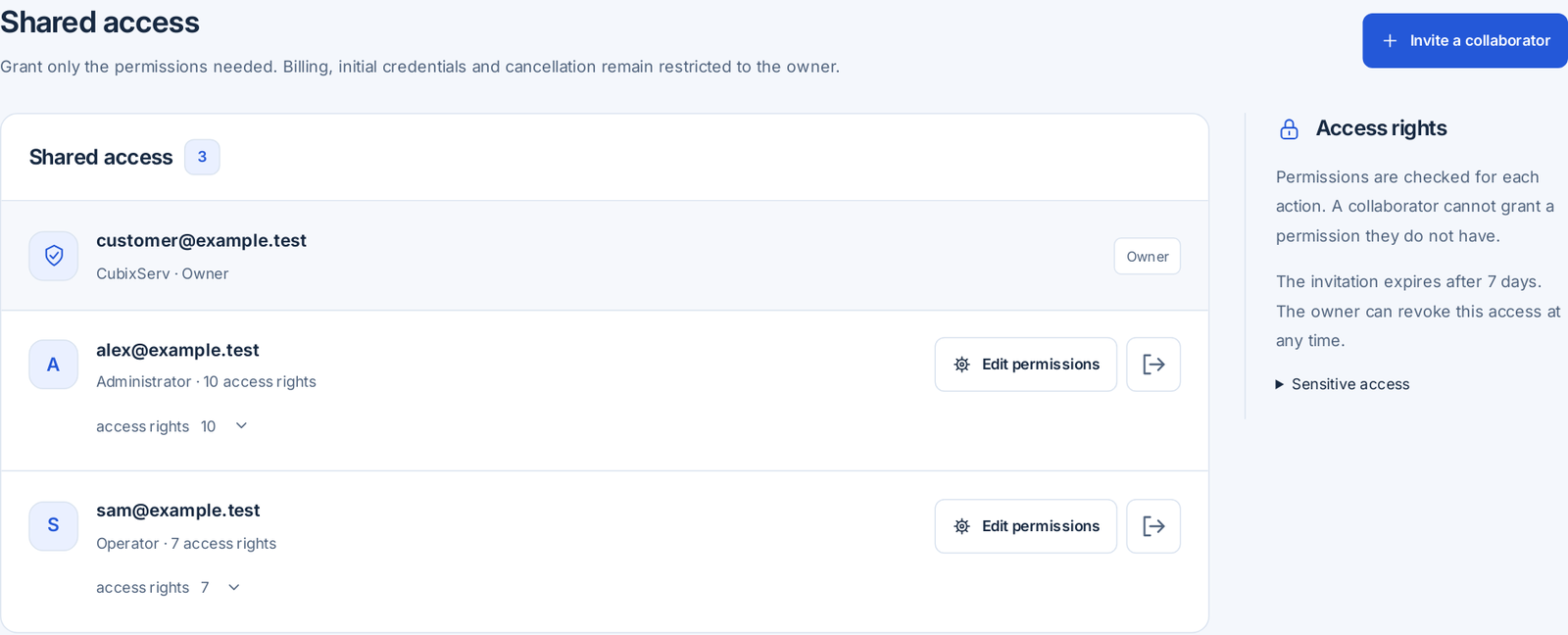
Open the console, monitor CPU, memory and network, manage shared access and prepare scheduled tasks. SSH or RDP access depends on the installed system. Sensitive actions require confirmation; restarting interrupts your applications.
OverviewActual panel, demonstration data.
Network & IPsActual panel, demonstration data.
Shared accessActual panel, demonstration data.
Remote access
Connect from your terminal with your chosen SSH key or initial credentials. The console is also available from the panel.
Console
The KVM console provides access even when SSH is unavailable. Click the screen to use the keyboard. Escape exits full screen.
Network & IPs
Manage your IP addresses, connections and firewall rules.
Shared access
Grant only the permissions needed. Billing, initial credentials and cancellation remain restricted to the owner.
Backups
Keep a restore point before an update. Stop the VPS before creating or restoring a point.
VPS GAMING / LINUX
Which VPS suits your game?
Choose a project to identify resources worth considering. This optional selector never stands between you and the prices or plan comparison.
An indicative starting point
Minecraft Java
4 GB RAM · 2 vCPU · 35 GB SSD
Paper/Purpur and Fabric or Forge/NeoForge use different extensions. Match Java to your chosen version, reserve memory outside the JVM and monitor chunks, simulation distance and the modpack. You install and maintain these applications on Linux.
You install and maintain the game and software on this VPS. No game, Docker or control panel comes preinstalled with this offer. These estimates guarantee no player count, TPS or latency; measure real load and leave room for Linux and backups.
Configure your game through a specialist panel and the tools available with its plan. You do not administer a full Linux system. Choose this route to focus on your community.
VPS Gaming · Linux / root
On a Gaming VPS you install the game server, dependencies, updates and backups. Root access gives you control and makes securing the system your responsibility. Multiple instances require sufficient resources, separate ports and compatible software.
Choose a compatible image, connect over SSH and install your software. You manage the system, updates and backups, with full control over your mods and configuration.
Install Linux versions compatible with your VPS and size resources for your mods, map and players. Prefer a panel built for the game? Explore our game server hosting below.
Minecraft Java+
Paper/Purpur and Fabric or Forge/NeoForge use different extensions. Match Java to your chosen version, reserve memory outside the JVM and monitor chunks, simulation distance and the modpack. You install and maintain these applications on Linux.
On a Gaming VPS you install the game server, dependencies, updates and backups. Root access gives you control and makes securing the system your responsibility. Multiple instances require sufficient resources, separate ports and compatible software.
Install Linux versions compatible with your VPS and size resources for your mods, map and players. Prefer a panel built for the game? Explore our game server hosting below.
Install FXServer and configure txAdmin, then your SQL database and ESX/QBCore resources where needed. Artifacts, scripts, assets and SQL queries affect CPU, RAM and disk use. Manage access, ports and consistent backups yourself.
Large maps and extensive building increase memory use and simulation work. Monitor CPU load and data growth before increasing the population.
Versions, extensions and compatibility.
Check uMod/Oxide or Carbon compatibility with your server version. Their popularity in Rust communities does not mean an automatic installer is included in the offer.
Plan backups and resource changes
Back up the world, player data and configuration before a wipe. Distinguish a map wipe from resetting blueprints, and notify your community.
Lua scripts, entities, physics and the map affect load. Test add-ons progressively: more RAM does not fix an expensive script loop.
Versions, extensions and compatibility.
Check the Workshop collection, mounted content and exact gamemode name. Workshop and FastDL are different mechanisms; separate FastDL hosting is not automatically included.
Plan backups and resource changes
Back up gamemode data, configuration and custom add-ons. If DarkRP uses an external database, back it up before changing extensions too.
For ARK: Survival Evolved, allow for the map, mods and persistent-world backups. Each instance adds files, memory needs and ports. Check the Linux server version and mod compatibility; this offer does not describe ARK: Survival Ascended.
Build 41 · Build 42 · Workshop ID · Mod ID · Sandbox · Lua / Java
What changes resource usage.
Zombie population, explored areas and mods increase workload. Leave memory for Java and space for saves; observe simulation under real conditions.
Versions, extensions and compatibility.
Clients must match the server branch and version. Build 41 saves are incompatible with Build 42; check each mod’s supported version too.
Plan backups and resource changes
Keep the world save, Sandbox files and server settings together. Make a copy before switching branches; reverting to an older version can make the world unusable.
Exploration, large bases and mods affect simulation. Valheim is designed for small-group cooperation; a large RAM allocation does not guarantee more players.
Versions, extensions and compatibility.
Steam and Crossplay use different backends. Confirm the connection mode and mod compatibility; clients may need matching mods to join a modded server.
Plan backups and resource changes
Keep the world’s .db and .fwl files together with access lists. Automatic game backups and panel backup slots are separate mechanisms.
For Unturned, check Linux server tools, maps and Workshop dependencies. Separate instance ports, retain configurations and test extensions before opening the server. Resource use depends on the world and activity.
Peeryx L3/L4 filtering acts upstream on exposed network traffic. The advertised 15 Tbps+ is global mitigation capacity, not your VPS speed or immunity. No application-specific profile for every game is promised; secure your software and access too.
See what your configuration could cost with the addresses and bandwidth you need. This estimate does not reserve any resources.
1 Gbit/s = 1,000 Mbit/s. Bandwidth is a rate; traffic is a transferred volume. A 1 Gbit/s port does not guarantee sustained downloads at that speed: CPU, storage, network paths and the remote server all matter. The limit is shared by every IPv4 on the VPS.
vCPUs share the host machine’s physical processor. RAM and disk figures describe resources allocated to your VPS. A host CPU’s maximum frequency is not a guaranteed frequency for each vCPU.
CUBIXSERV / PANEL
Your system. Your applications. A panel to manage them.
Open the console, monitor CPU, memory and network, manage shared access and prepare scheduled tasks. SSH or RDP access depends on the installed system. Sensitive actions require confirmation; restarting interrupts your applications.
Plan backups and resource changes
Check backup slots, limits and pricing in the configurator. Verify a successful backup before reinstalling or making a major change. Resource upgrades depend on compatibility and available capacity.
Network and protection, with a clear scope.
Peeryx supplies upstream transit and Anti-DDoS filtering. Covered protocols, bandwidth, traffic and available addresses must be confirmed for your offer. The protection network’s aggregate capacity is not your VPS bandwidth.
Configure the system firewall, prefer SSH keys, install updates and back up your data. Network filtering complements these measures. Plesk, third-party licences and antivirus tools are not automatically included.
From choosing a plan to your first deployment.
Size your project
Start with your application requirements. Leave memory and free space for the operating system, updates and backups.
Check pricing and the system
Choose the term, compatible image and options. Check the amount due, renewal and any setup fees before confirming.
Secure, then measure
Set up access and updates. Install applications, inspect the panel’s measurements and test a backup before accepting users.
You install and maintain the game and software on this VPS. No game, Docker or control panel comes preinstalled with this offer. These estimates guarantee no player count, TPS or latency; measure real load and leave room for Linux and backups.
Can I run several game servers?+
On a Gaming VPS you install the game server, dependencies, updates and backups. Root access gives you control and makes securing the system your responsibility. Multiple instances require sufficient resources, separate ports and compatible software.
What does the DDoS protection cover?+
Peeryx L3/L4 filtering acts upstream on exposed network traffic. The advertised 15 Tbps+ is global mitigation capacity, not your VPS speed or immunity. No application-specific profile for every game is promised; secure your software and access too.
Does the selector guarantee performance?+
You install and maintain the game and software on this VPS. No game, Docker or control panel comes preinstalled with this offer. These estimates guarantee no player count, TPS or latency; measure real load and leave room for Linux and backups.
Marseille, France · Connected to Europe
Based in Marseille. Connected to Europe.
Our infrastructure is based in Marseille, southern France. Direct interconnections to Frankfurt, Milan, Madrid, Amsterdam, London and Switzerland help keep latency low for your players and applications across Europe.